
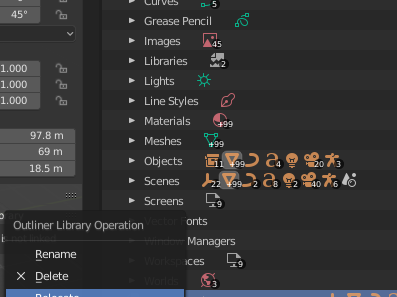
reload link file

Utilization of links

Blender's link is one of the indispensable functions in architectural design examination and perspective creation.

In my case, the surrounding site, plants, cars, etc.Models that tend to be high polygonsis divided into separate files and read into the rendering scene as a link.

reload

It was difficult to understand how to reload the link from the rendered scene when I finished modifying the model that was divided into separate files, so I will introduce it.

firstoutlinecontent to display inBlender FileChange to. 
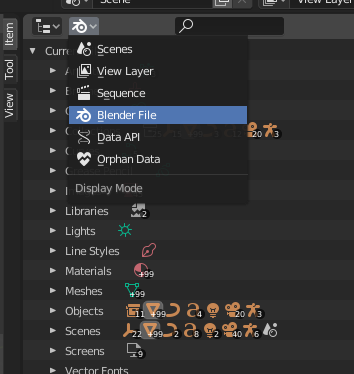
Right click on the file name you want to reload.
ReloadChoose. If the file path has changedRelocateplease choose. 
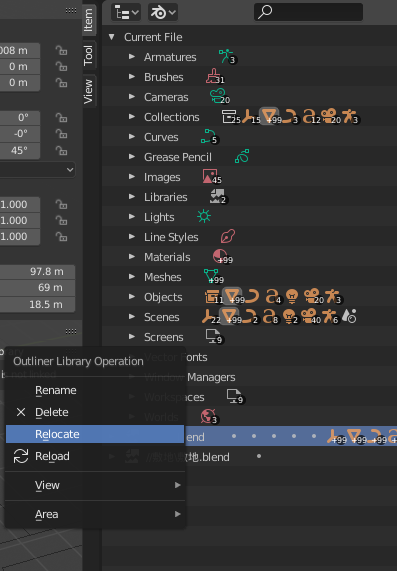
This reload procedure has been pointed out by overseas users that it is difficult to understand, so it may be fixed in 3.0 or later.
Contact

We welcome project inquiries and consultation.

  • Planning and design of architecture, interiors, and exhibition spaces
  • Planning and design of furniture, products, and objects
  • Product development using recycled and unused materials
  • Digital fabrication support using 3D printing, CNC, and related technologies
  • 3DCG visualization for architecture, interiors, and products
  • Simulation and parametric study support using Grasshopper and Python

Early-stage and concept-phase inquiries are also welcome.

Even if the outline of your project is not yet fully defined, please feel free to get in touch.

営業・勧誘目的の送信について

本フォームは、当社へのご依頼、製品に関するお問い合わせ、取材・協業等のご相談を目的としています。

当社が依頼していない営業・広告・宣伝・勧誘を目的とした送信を固く禁止します。

上記に反して営業目的の内容が送信された場合、当社に発生する確認・対応等の費用について、1件あたり10,000円を基準として請求する場合があります。

なお、製品の取扱い、共同開発、具体的な協業のご相談は対象外です。

en_USEN